Benchmark – Active Directory Lab
This assignment requires the use of GCU Virtualization Solutions, located in the Class Resources.
In this topic, you have been introduced to the installation of a server operating system in a virtual environment and its hardware components. You will utilize this working environment to complete assignments throughout the course.
In this lab, you will create an enterprise virtual sandbox environment that will protect the confidentiality of the information from unauthorized sources and the availability of the information for the real owners. You will also set administrative rights, user groups, and privileges through a command line interface.
In preparation for the lab, research the Windows command line interface and review the “Command Line Interface” reading, located in the topic Resource. Also refer to “1-3 Exploring the Azure Desktop and Hyper-V Environment,” “1-4 Installing Active Directory,” and “1-5 Configuring Active Directory,” from the CYB-515 video playlist located in Class Resources to complete this assignment.
Part 1:
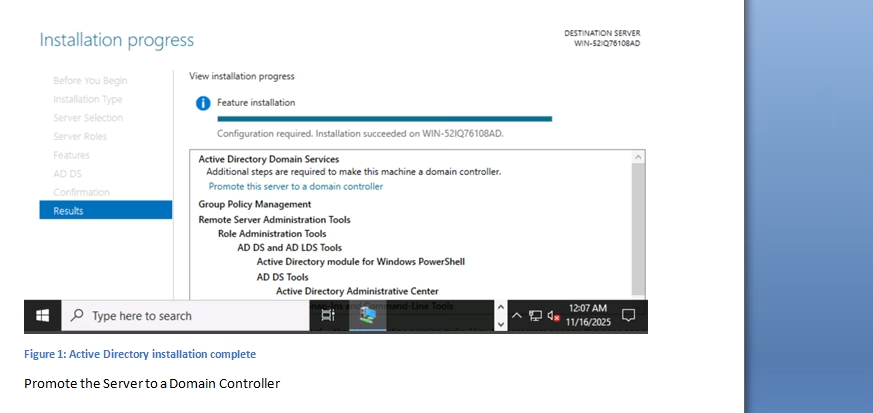
Provide screenshots of the successful installation and configuration of the active directory, the creation of 10 accounts through the command line interface, and the creation of groups using PowerShell. Create a single Microsoft Word document addressing Parts 1 and 2 and submit it to the assignment dropbox. Do not submit multiple documents or individual screenshots.
Building upon the virtualization skills learned in CYB-505, complete the following:
· Install and configure Active Directory on the Windows Server 2019 VM as a mechanism for access control. Create a root domain using your last name and appending ‘.com’ to it (i.e., YourLastName.com).
· Create an organizational unit (OU) named CYB-515 in the root domain.
· Using the Windows command line interface (command prompt), set up and configure at least 10 user accounts in the CYB-515 OU. Make sure one of the accounts is using your first and last name.
· Using PowerShell, which is a command line shell and scripting language, create the following five groups in the CYB-515 OU: Research and Development Department, Marketing Department, Sales Department, Human Resources Department, and IT Department.
· Design and implement password policies in Active Directory for each of the five groups.
Part 2:
Write a 500- to 750-word summary addressing the following:
· Identify vulnerabilities and risks to an organization’s critical infrastructure if access control is not implemented.
· Describe why each principle of access control is important to security and how it enables the development of security mechanisms that can implement desired security policies, as it relates to Active Directory.
· Analyze workstations, servers, appliances, mobile devices, and/or peripheral devices in an enterprise network. Identify two common security failures and the specific design principles that have been violated.
· Describe the basic security implications of modern computing environments.
· Discuss how to develop efficient and effective system solutions to safely secure digital assets and intellectual property.
· Describe four hardware components of modern computing environments and discuss the individual functions of each component. Explain which would be the easiest to secure and why.
· Identify the secure design principles involved or needed in the creation of user accounts while ensuring the principle of least privilege.
· Explain how virtualization is different in the Windows and Linux operating systems.
Place all screenshots in a Microsoft Word document and submit it to the assignment dropbox. When submitting screenshots as part of your assignment, you must always include a full image of your desktop window, including the date and time in the lower right-hand corner of the Windows desktop or the upper-right corner of the macOS desktop.
While APA style is not required for the body of this assignment, solid academic writing is expected, and documentation of sources should be presented using APA formatting guidelines, which can be found in the APA Style Guide, located in the Student Success Center.
This assignment uses a rubric. Review the rubric prior to beginning the assignment to become familiar with the expectations for successful completion.
You are required to submit this assignment to LopesWrite. A link to the LopesWrite technical support articles is located in Class Resources if you need assistance.
Benchmark Information
This benchmark assignment assesses the following programmatic competencies:
MBA Cybersecurity
5.1: Identify vulnerabilities and risks to an organization’s critical infrastructure.
MS Information Assurance & Cybersecurity
4.3: Identify vulnerabilities and risks to an organization’s critical infrastructure.
Tutorial for Benchmark – Active Directory Lab