Week 3: Hardening Lab
This assignment requires the use of GCU Virtualization Solutions, located in the Class Resources.
Hardening a system provides an additional layer of security by removing access and possible vulnerabilities from the system. Security principles such as deter, deny, delay, and detect are used to reduce attack surfaces and possible vectors.
In preparation for this lab, refer to the “3-2 Hardening Lab,” from the CYB-515 video playlist located in Class Resources to complete this assignment. These will walk you through Part 1 of this lab. For Part 2, you will need to research the required commands on your own.
Note: There is no lab video for Part 2 of this lab.
Part 1
In this lab, you will perform, for a Linux operating system (OS), the steps necessary to harden the OS with respect to various applications. Provide screenshots of each step in Part 1 and include 1-2 sentences summarizing what the screenshot is illustrating.
In the virtual sandbox environment, you will perform the steps to harden a Linux distribution by completing the following:
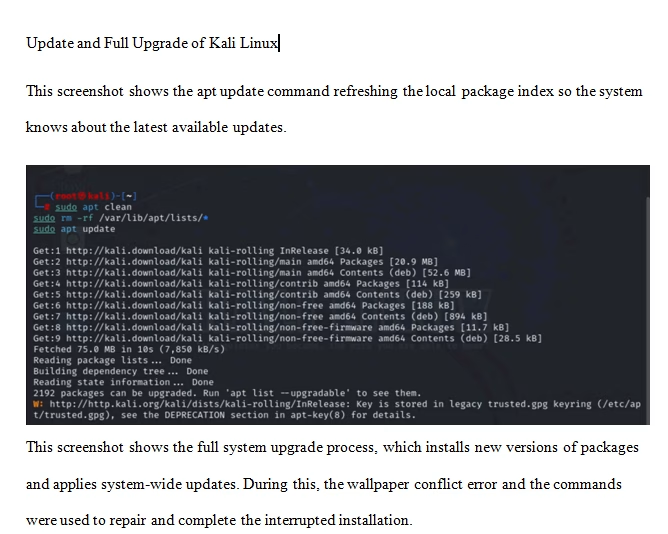
- Perform an update and a full upgrade of your Kali Linux VM.
- Run a basic Lynis scan (lynis audit system) on your Kali Linux VM.
Part 2
In Part 2, you will securely configure the Windows Server 2019 operating system (OS), remove and/or shut down unnecessary features and system services, close unnecessary ports, and ensure that all patches and updates are applied.
Open-source antivirus (A/V) means that the source code for the program is accessible to the general public and anyone can inspect, modify, and enhance it. A proprietary source A/V product is where only the programmers for the software company can legally copy, inspect, and alter that software. The considerations when discussing potential faults and vulnerabilities with using the program are very different. The assignment asks you to research open-source A/V software. Do not confuse free A/V with open-source A/V; they are two very different things.
Provide the results of each hardening step in Part 2 and include 1–2 sentences summarizing what the screenshot is illustrating.
All the screenshots will be used to manage network configuration and sessions to ensure port security that will harden the Windows Server. Access the Windows Server 2019 VM and perform the following hardening steps:
- Disable automatic administrative logon to the recovery console.
- Install BitLocker Drive Encryption on the Windows Server 2019 VM and encrypt the Windows Server 2019 VM’s disk.
- Enable the Windows firewall in all profiles (domain, private, and public) and configure it to block inbound traffic by default.
- Perform port blocking at the network setting level. Perform an analysis to determine which ports need to be open and restrict access to all other ports.
- Disable NetBIOS over TCP/IP.
- Check the Windows Defender settings.
- Do not store LAN Manager hash values.
- Set the LAN Manager authentication level to allow only NTLMv2 and refuse LM and NTLM.
- Any changes you make must not break domain the controller functionality.
- Disable unneeded services. Most servers have the default install of the operating system, which often contains extraneous services that are not needed for the system to function and may represent a security vulnerability. Therefore, it is critical to remove all unnecessary services from the system.
- Remove unneeded Windows features. Any unnecessary Windows features should be removed from critical systems to keep the servers in a secure state.
- Install an open-source antivirus program of your choice.
- Run your antivirus program against your machine.
Part 3
Examine the antivirus program you installed. Research potential faults and vulnerabilities within the program, including the open-source nature of the program.
Write a 250- to 500-word summary based on the open-source antivirus program you installed. Examine the placement of security functions in a system and describe the strengths and weaknesses. Describe the requirements analysis necessary to formulate and deploy business information systems solutions within an organization.
All screenshots must include a full image of your desktop window, including the date and time in the lower right-hand corner of the Windows desktop or the upper-right corner of the macOS desktop.
While APA style is not required for the body of this assignment, solid academic writing is expected, and documentation of sources should be presented using APA formatting guidelines, which can be found in the APA Style Guide, located in the Student Success Center.
This assignment uses a rubric. Review the rubric prior to beginning the assignment to become familiar with the expectations for successful completion.
You are required to submit this assignment to LopesWrite. A link to the LopesWrite technical support articles is located in Class Resources if you need assistance.
Tutorial for Hardening Lab