Week 4: Backing Up and Restoring System Files Lab
This assignment requires the use of GCU Virtualization Solutions, located in the Class Resources.
Having solid backup systems in place is an essential business function, as human error, unforeseen disasters, and other circumstances can cause data and files to be erroneously deleted. Loss of data often has potentially devastating effects on an organization if it cannot be restored.
Refer to the “4-2 Backing Up and Restoring System Files Lab,” from the CYB-515 video playlist located in Class Resources to complete this assignment.
Part 1
For this assignment, set up a full backup of the server and test to see whether or not the backups are functioning correctly by restoring content that was mistakenly deleted during routine maintenance. As you complete each step of the assignment, take screenshots of the full backup, the deletion of the “Special Customers” folder, and the restoration of the “Special Customers” folder from the full backup.
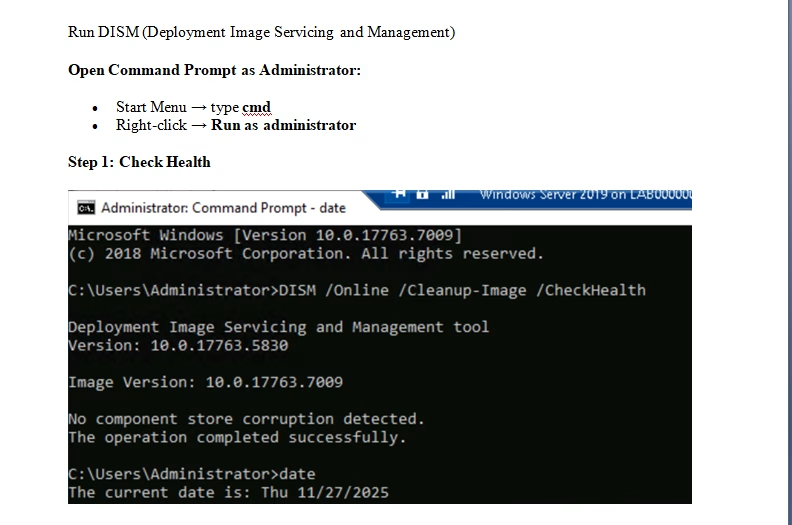
- Using the Deployment Image Servicing Management tool (DISM), the System File Checker (SFC) command, and the Check Disk (CHKDSK) command, perform file maintenance on the Windows Server 2019 C: drive to confirm that there is no file corruption of your Windows Server 2019 VM.
- Create a folder named “Special Customers + your last name” in your Documents folder.
- Within the “Special Customers” folder, create one text file named “Special Customers” and add three names to it: Mary Smith, Thomas Green, and Taylor Jones. Make sure to save the file.
- Perform a full backup as part of routine maintenance for the Windows Server 2019.
- Delete the “Special Customers” folder.
- To test whether the full backup functions correctly, restore the “Special Customers” folder from the full backup.
Part 2
Write a 250- to 500-word summary addressing the following:
- Describe how you perform backups and restore data to the system from a backup.
- Provide a summary of what you were accomplishing when you completed the backup and tested whether it was functioning correctly.
- Explain why performing backups and having the ability to restore files is an essential skill for cybersecurity professionals.
All screenshots must include a full image of your desktop window, including the date and time in the lower right-hand corner of the Windows desktop or the upper-right corner of the macOS desktop.
While APA style is not required for the body of this assignment, solid academic writing is expected, and documentation of sources should be presented using APA formatting guidelines, which can be found in the APA Style Guide, located in the Student Success Center.
This assignment uses a rubric. Review the rubric prior to beginning the assignment to become familiar with the expectations for successful completion.
You are not required to submit this assignment to LopesWrite.
Tutorial for Backing Up and Restoring System Files Lab